
Diagnostics and DTC
Fault memory is first-class: read active and stored codes, inspect the freeze frame, read the supported list and clear the memory when the work is done.
Reading faults
- ECU List → Read DTC reads current faults from every ECU in the project.
- Read DTC List reads the full list of codes the ECU supports, whether or not they are stored.
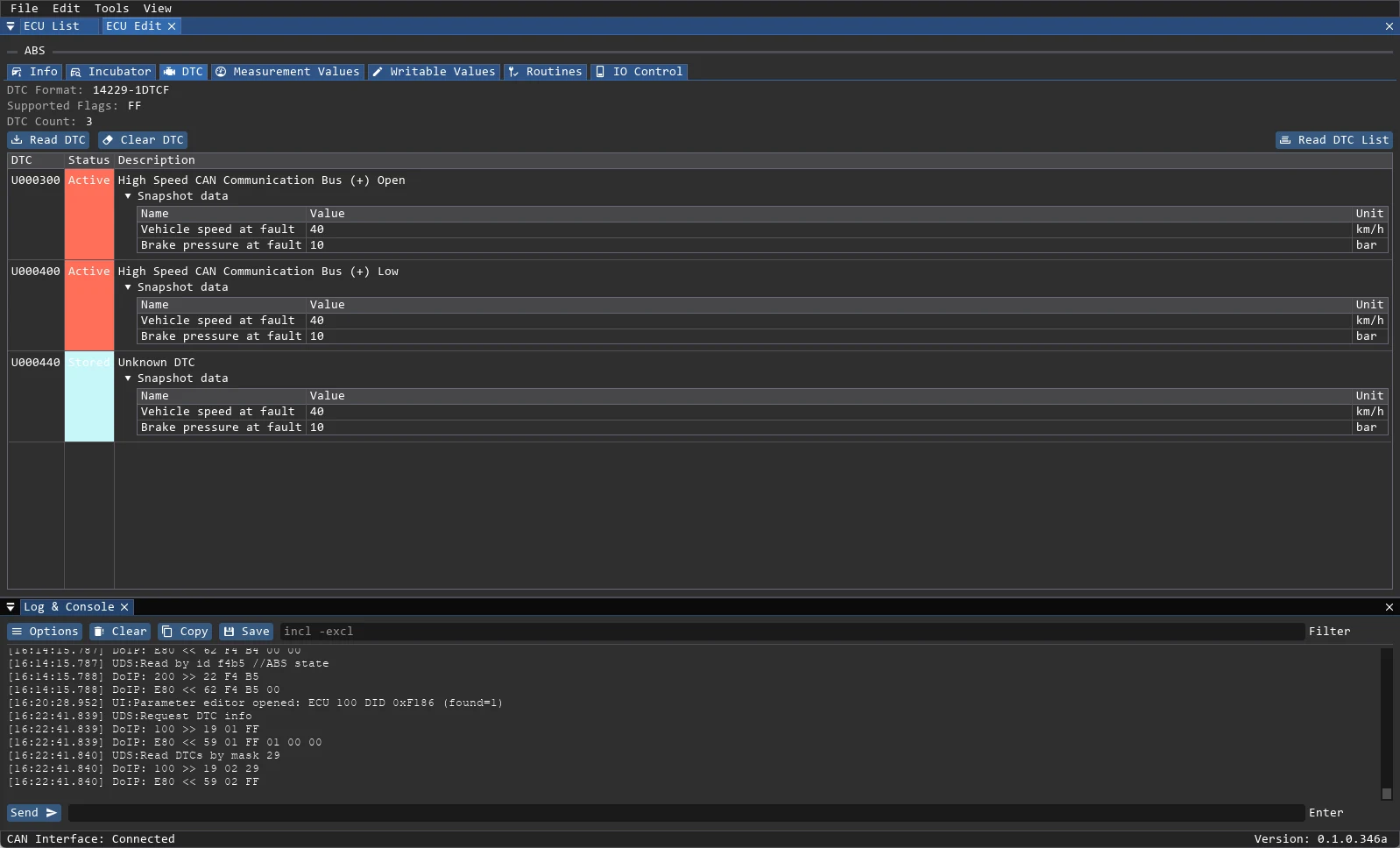
- ECU Edit → DTC does the same for one ECU and shows the decode.
- The DTC tab header shows the DTC format, the supported status flags and the number of stored codes.
Status colours
| Colour | State |
|---|---|
| Red | Active — the fault is present now |
| Blue | Stored — the fault was recorded earlier |
| Green | Not Active — supported but not currently set |
The colour is a UI hint, not a replacement for the status byte. The raw status stays available in the log.
Snapshot / freeze frame
Each code can carry snapshot data recorded at the moment of failure: vehicle speed, temperature, voltage and other DIDs defined by the ECU. Expand the snapshot section under a code to see the values with units. The layout comes from the project's dtc_snapshot_data template, so unknown fields are shown as raw values rather than guessed.
Formats and databases
- J2012, ISO 14229-1 and J1939-73 decoding are supported.
- Global descriptions:
<workspace>/data/dtc/codes.jsonor.txt. - Project-local descriptions: Project Properties → Local DTC File (
.jsonor.txt). - JSON uses a
codesmap; TXT uses oneCODE descriptionline per code. Lines starting with#or;are ignored. - Codes may be
P,C,BorUfollowed by 5 or 7 hex characters. - If a file is missing, its path in Project Properties is highlighted in red.
Clear and export
- Clear DTC clears the selected ECU; the ECU List button clears every ECU. Both ask for confirmation.
- Save a project dump (ECU List → Save/Load → Save Data) before clearing if the fault history matters.
- The ECU table itself can be exported to CSV (separator
;, trailing;) from the ECU List.
Practical notes
- Read the supported list once and compare it with the current fault list: codes outside the supported list are often vendor extensions.
- Clearing faults does not fix them. Save the table and the snapshots before clearing.
- If a code returns immediately after a clear, the fault condition is still present; investigate the signal rather than repeating the clear.
- A code without a description is still read and exported correctly; only the text is missing.